
Our website is here to provide inspiration for your next promotion. If you’re ready to get started with your order, contact a promo specialist: promo@admiralexpress.com.
- Getting product images...
- Identifying imprint areas...
- Calculating canvas size...
- Rendering...
- Calculating image size...
- Validating image...
- Uploading image to server...
- Creating a layer...
- Saving the project...
- Creating project preview..
- Applying design to product...
- Rendering...
- Sending image for processing...
- Applying effects...
- Getting image from server...
- Creating a layer...
- B
- I
Print Color:
- Rectangle
- Circle
- Ellipse
- Triangle
- Line
- Polyline
- Free draw
Shape Color:
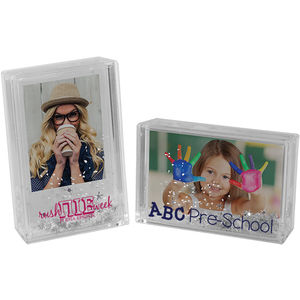
2756 Instax Mini Snow Picture Frame
!s=300.jpg "1167884")
Instax Mini Snow Picture Frame
Holds a vertical or horizontal Instax Mini Film photo
The clear plastic frame contains snow, glitter, and silver snowflakes that move around
To insert your photo pop out the plastic lens on the back of the frame, insert your photo, snap in the plastic lens, and shake!
Print type and position
Plain Stock1 Position:
All dimensions are in inches
Dimensions
2in(w)1in(h)2in(d)
Loading...
